
In today’s digital landscape, social media platforms like Instagram provide an invaluable opportunity for users to share and engage with content. One common question among users is how to repost on instagram. Whether you want to share a friend’s amazing vacation photo or an inspiring quote from your favorite influencer, reposting can help you connect with your audience in a meaningful way. In this article, we’ll explore various methods and tips on how to repost on Instagram effectively.
Understanding Instagram’s Repost Culture
Reposting on Instagram involves sharing someone else’s content on your own profile, typically with attribution to the original creator. It’s crucial to understand the etiquette of reposting: always give credit to the original poster. Not only is it respectful, but it also helps maintain transparency on the platform. Users appreciate knowing who the original creator is, and it encourages a culture of sharing and collaboration.
Methods to Repost on Instagram
There are several methods to repost on Instagram, each with its own advantages and disadvantages. Below, we break down the most popular options.
1. Manual Reposting
If you prefer a hands-on approach, you can manually repost content. To do this, follow these steps:
- Take a screenshot of the post you want to share.
- Crop the image to focus on the content, removing any unnecessary elements.
- Open Instagram and create a new post using the edited image.
- In the caption, mention the original creator by tagging them and adding a note that this is a repost.
This method is straightforward and doesn’t require additional tools. However, the quality may decrease, and cropping can sometimes miss key information.
2. Using Repost Apps
There are several third-party applications designed specifically for reposting on Instagram. These apps typically allow you to copy the link to a post and automatically format it for reposting. Some popular repost apps include:
- Repost for Instagram
- Regrammer
- Repost It
To use these apps, follow these general steps:
- Download and install a repost app from your mobile app store.
- Open Instagram and find the post you wish to repost.
- Tap the three dots in the upper right corner of the post and select “Copy Link.”
- Open your repost app, and it should automatically detect the copied link.
- Edit the caption for your repost, add any necessary hashtags and click “Share.”
Using a repost app often provides better-quality images and maintains a professional appearance.
Best Practices for Reposting
While reposting is relatively simple, adhering to best practices can significantly enhance your experience and the quality of your posts. Here are some tips to consider:

1. Always Credit the Original Creator
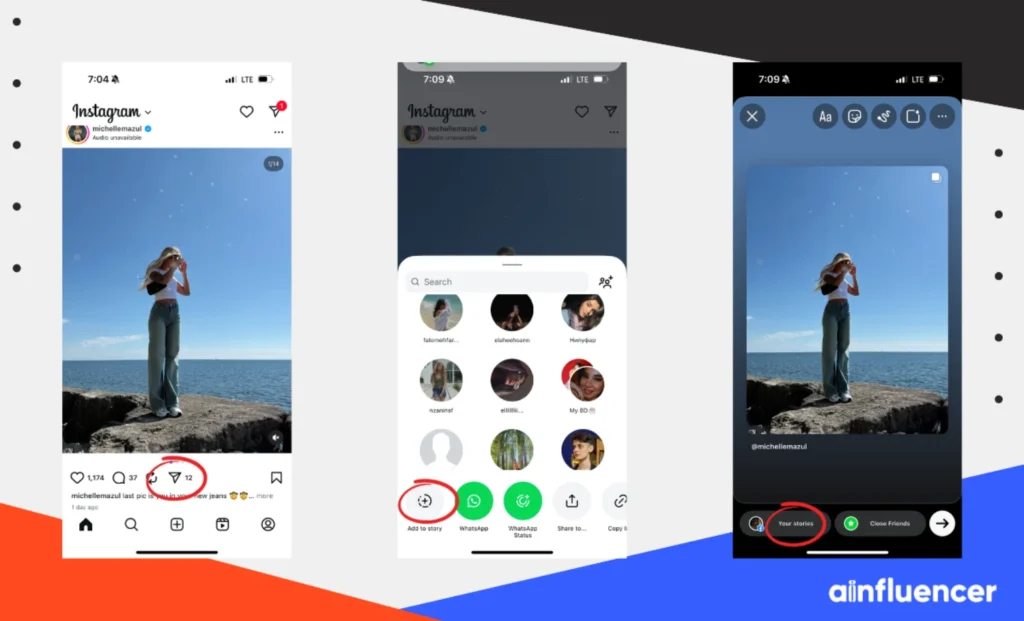
This is not only good etiquette but also a common requirement. Most users appreciate being acknowledged, and it encourages a positive community vibe. Tagging the original user in your post creates an opportunity for others to discover their content as well.
2. Choose Quality Content
Before reposting, consider the quality and relevance of the content. Make sure it aligns with your brand or personal image. High-quality images and engaging captions are more likely to resonate with your audience. Always strive to share content that adds value to your feeds, such as information, inspiration, or entertainment.
3. Respect Privacy
Before reposting someone’s content, be sure to respect their privacy. Some users may not be comfortable with their posts being shared, even with credit. If you’re unsure, reach out to the original creator for permission. This step can foster good relationships and further aid in community building.
4. Use Hashtags Wisely
When reposting, it’s beneficial to use relevant hashtags to increase visibility. This helps your post reach a broader audience while also connecting with niche communities. Research popular and trending hashtags in your area of interest to improve engagement.
5. Engage with the Original Post
When reposting, it’s a good idea to engage with the original post. Like the post, leave a thoughtful comment, and share your own insights when relevant. This interaction not only builds relationships but also can encourage reciprocal engagement.
When Not to Repost
While reposting can be a great way to share content, there are times when it may be inappropriate:
- If the original content contains sensitive information or personal details.
- When a creator expressly requests that their content not be shared.
- If the content is promotional or advertising-based without permission.
Conclusion
Reposting on Instagram offers an effective way to share engaging content while connecting with your audience and the broader Instagram community. By understanding the methods, best practices, and etiquette surrounding reposting, you can navigate this feature with confidence. Whether you choose to manually repost or utilize dedicated apps, the important thing is to respect creators, maintain quality, and prioritize meaningful engagement. Start using these tips today to enhance your Instagram experience and community connections!